> ## Documentation Index
> Fetch the complete documentation index at: https://docs.taqtile.com/llms.txt
> Use this file to discover all available pages before exploring further.
# Connect Server Configurations | WebRTC vs. LiveKit
> Learn which figuration works best for your team and how to switch.
Connect is Manifest's built-in remote assist feature. As a user with the Admin role, you can now choose which server powers Connect for your domain: **WebRTC** (legacy) or **LiveKit** (new). LiveKit enables group calls. Pick the one that best fits how your team works.
## Choosing your server
| What's Supported | WebRTC (legacy) | LiveKit (new) |
| ------------------------------------------ | --------------- | ------------- |
| 1:1 calls | Yes | Yes |
| Group calls | No | **Yes** |
| Stability and reliability | Standard | Improved |
| Web client (desktop, tablet, mobile) | Yes | Yes |
| iPad app | Yes | No |
| 3D apps (HoloLens, Meta Quest, Magic Leap) | Yes | No |
If your team relies on iPad or 3D devices, we recommends staying on WebRTC. If your team works primarily on the web and needs group calls, consider switching to LiveKit.
## How to switch your domain
1. **Log in to the Web app** as an Admin
2. Open **Settings** > **Server Configuration**
3. Using the dropdown, select either **WebRTC** or **LiveKit**.
4. Select **Update** to save your changes.
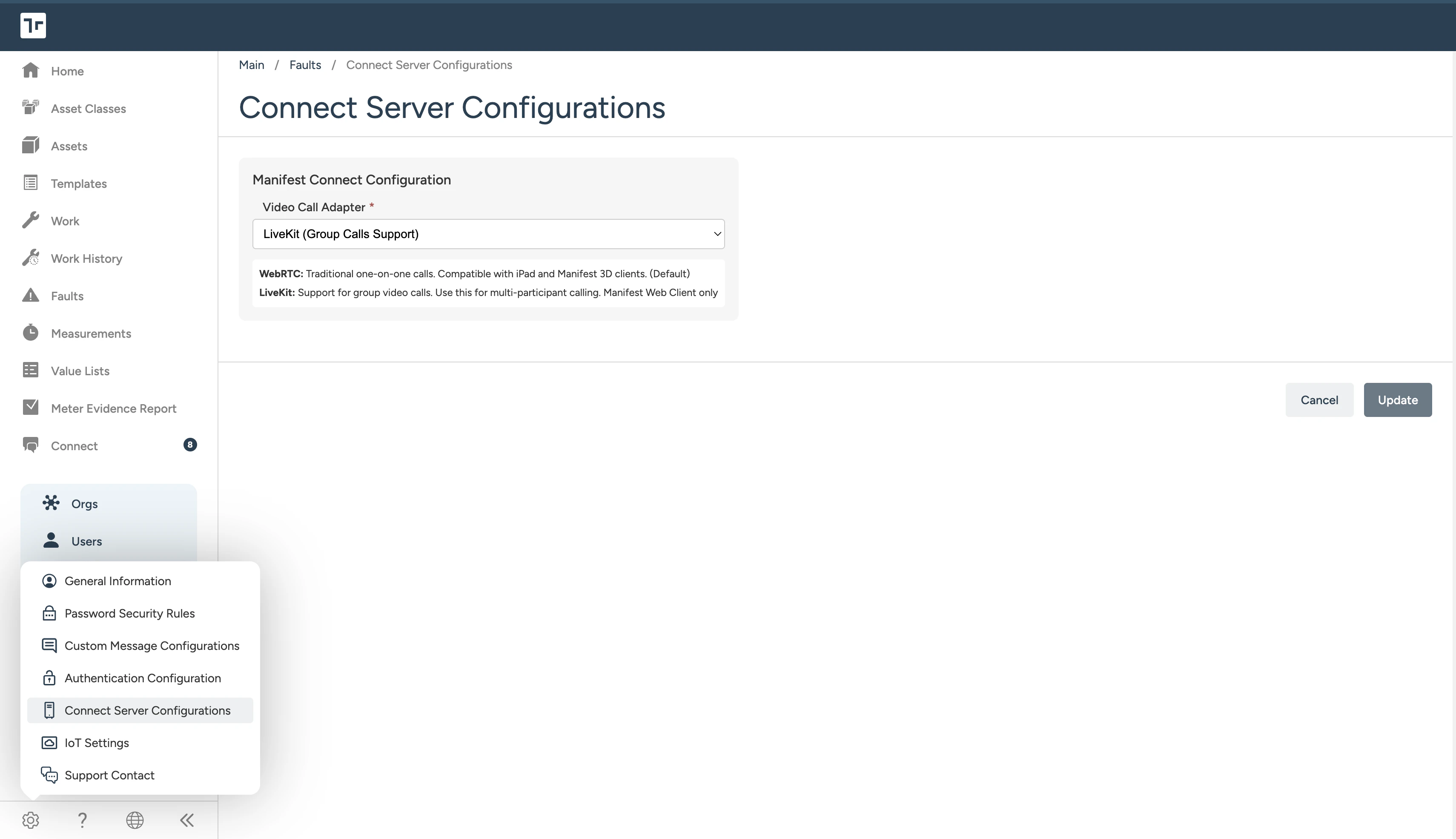 The new setting takes effect for any new calls started after the change. Active calls will continue on the previous server until they end.
## What to expect after switching to LiveKit
* Web users will be able to participate in group calls in group chats
* Web users will be able to copy call links to send to other participants
* iPad and 3D users will not be able to start or join Connect calls until you switch back to WebRTC
* Existing chat history, contacts, and channels are preserved
## About LiveKit group calls
The new setting takes effect for any new calls started after the change. Active calls will continue on the previous server until they end.
## What to expect after switching to LiveKit
* Web users will be able to participate in group calls in group chats
* Web users will be able to copy call links to send to other participants
* iPad and 3D users will not be able to start or join Connect calls until you switch back to WebRTC
* Existing chat history, contacts, and channels are preserved
## About LiveKit group calls
 * To initiate a group call, use an existing or new group chat
* Use the call link or "Call"/"Join" button to start or join the call
* To participate in a group call, a user must be a member of the group chat where the call is taking place
* *Warning: Messages sent within the call window chat will not be retained once the call ends*
## Tips
* **Test first:** If you have a sandbox or staging domain, switch it to LiveKit before rolling out to production
* **Communicate the change:** Let iPad and 3D users know calling won't be available on those platforms while LiveKit is enabled
* **Stay on WebRTC if you're tablet- or AR-first:** Group calls aren't worth losing iPad and HoloLens support if those are your primary devices
## Using LiveKit with Docker
4.5 Docker release coming soon, with full self-hosting instructions to follow.
## FAQs
**Can I switch between WebRTC and LiveKit later?** Yes. You can change the setting at any time. There's no migration step.
**Will my chat history or contacts be lost when I switch?** No. Only the calling infrastructure changes — your chats, channels, and contacts stay the same.
**What happens if an iPad or 3D user tries to start a call while LiveKit is enabled?** They'll see a message that calling isn't available on their platform. Direct them to the Web app, or switch the domain back to WebRTC.
**Can different domains use different servers?** Yes. The setting is configured per domain, so you can run WebRTC on one and LiveKit on another.
**Does LiveKit require additional licensing or setup?** No additional setup is needed on your end — just toggle the server in domain Settings.
**How many people can join a group call on LiveKit?** The current participant limit for group calls is 25 users.
***
Need help? [Contact support](mailto:support@taqtile.com).
* To initiate a group call, use an existing or new group chat
* Use the call link or "Call"/"Join" button to start or join the call
* To participate in a group call, a user must be a member of the group chat where the call is taking place
* *Warning: Messages sent within the call window chat will not be retained once the call ends*
## Tips
* **Test first:** If you have a sandbox or staging domain, switch it to LiveKit before rolling out to production
* **Communicate the change:** Let iPad and 3D users know calling won't be available on those platforms while LiveKit is enabled
* **Stay on WebRTC if you're tablet- or AR-first:** Group calls aren't worth losing iPad and HoloLens support if those are your primary devices
## Using LiveKit with Docker
4.5 Docker release coming soon, with full self-hosting instructions to follow.
## FAQs
**Can I switch between WebRTC and LiveKit later?** Yes. You can change the setting at any time. There's no migration step.
**Will my chat history or contacts be lost when I switch?** No. Only the calling infrastructure changes — your chats, channels, and contacts stay the same.
**What happens if an iPad or 3D user tries to start a call while LiveKit is enabled?** They'll see a message that calling isn't available on their platform. Direct them to the Web app, or switch the domain back to WebRTC.
**Can different domains use different servers?** Yes. The setting is configured per domain, so you can run WebRTC on one and LiveKit on another.
**Does LiveKit require additional licensing or setup?** No additional setup is needed on your end — just toggle the server in domain Settings.
**How many people can join a group call on LiveKit?** The current participant limit for group calls is 25 users.
***
Need help? [Contact support](mailto:support@taqtile.com).