
Overview
Manifest Connect is a powerful tool allowing team members to collaborate real-time across various devices using Manifest. Powered by an industry standard WebRTC server, Manifest Connect enables text and video chats, file sharing, and advanced, real-time AR guidance. If you encounter issues using Manifest Connect, please find suggestions for troubleshooting below - but first please, check your network connection.A reliable network connection with enough bandwidth for all team members using Manifest Connect is fundamental to a good experience. The bandwidth required to use Manifest Connect is similar to the amount required for other apps using WebRTC such as Microsoft Teams and Zoom. A single audio/video stream consumes about 500kbps while a 2-way stream consumes about 1-1.5Mbs. The upper range of 1.5Mbps is required for video resolution of HD 1080P at 30fps.
Troubleshooting from your 3D Head-mounted device
| Are there any network outages? | If you are experiencing persistent connectivity issues with Manifest Connect, check with your network administrator or service provider to ensure there are no underlying network issues or outages. |
|---|---|
| Have you accepted all Manifest application permissions? | Be sure that you have accepted permissions for Manifest to access your Camera and Microphone. To check if you have these enabled, go to Settings -> Privacy on your device. |
| Has your session been disconnected from the server? | If you see a red circle icon on the account display of the command strip and a red WiFi icon to the left of the command strip, it indicates a weak connection. This can happen if you have awoken your device and relaunched an idle Manifest session. The application will attempt to reestablish a connection, and if successful will return a green circle icon on the command strip. If this does not automatically occur, restart the application to connect to the server again. |
| Are you over-taxing the network bandwidth? | Performance issues may be experienced if you are trying to run a Manifest Connect session while simultaneously loading content, such as templates, images, or videos, into Manifest. |
| Are you using the camera or microphone for other features at the same time as your Manifest Connect session? | Manifest Connect sessions require the use of the device camera and microphone. For this reason, you may run into issues if you are attempting to use other features relying on these tools during a Manifest Connect session, e.g., voice messages, voice-to-text, or image and video notes. |
| Are you on a network that restricts UDP and TCP traffic? | If Manifest Connect consistently fails to connect, please check with your network administrator and ensure that your network is not restricting UDP or TCP traffic. If the above does not correct the issue, there may be an underlying network issue preventing persistent connections to the Manifest server. In that case, please talk to your network administrator to investigate if there are any network outages or check with your service provider. |
Troubleshooting from your Desktop Browser
| What browser are you using? | Please make sure you are using Chrome as your preferred browser and that it’s up to date with the latest version. |
|---|---|
| Does your PC have a camera? | Manifest Connect calls won’t connect to PC’s that do not have cameras. |
| Have you have enabled Audio and Video access in your Chrome Browser? | Check your settings following these steps: 1. With Chrome open, click or tap the Menu at the top right-hand corner 2. Choose settings 3. Go to Privacy and Security 4. Under Privacy and Security, scroll down to Site Settings 5. Choose the Camera or Microphone to access either setting 6. Scroll all the way down the page and open the “Advanced” link 7. Scroll to the bottom of the Privacy and Security section and choose Content Settings 8. Choose Camera or Microphone to access either setting |
| Are you logged out of all other instances of Manifest? | You need to be logged out of all instances of Manifest which includes head mounted display, iPad, Browsers, Android, etc. |
| Are add-ons disabled? | Please make sure auto-play blocker add-ons are disabled? To do this: 1. Open a site in Google Chrome 2. In the address bar, click on the green padlock or info button 3. Select Site Settings 4. Scroll down to find Ads 5. In the drop-down menu, select “Allow” 6. Close Settings Tab |
| Is your camera being used by another application (ie: Teams, Skype, etc.)? | Close out of other applications that might be accessing your camera and try again. |
Advanced Network Troubleshooting
Check your Manifest Settings for Server Configuration
Check the ICE Server configuration settings under Manifest Settings in the Client Portal. Please note that only Admin users have access to view and edit these settings. They should look like the below if you are using Taqtile Connect servers. If your company has configured their own turn servers for this setting, you will need to consult with your domain Administrator.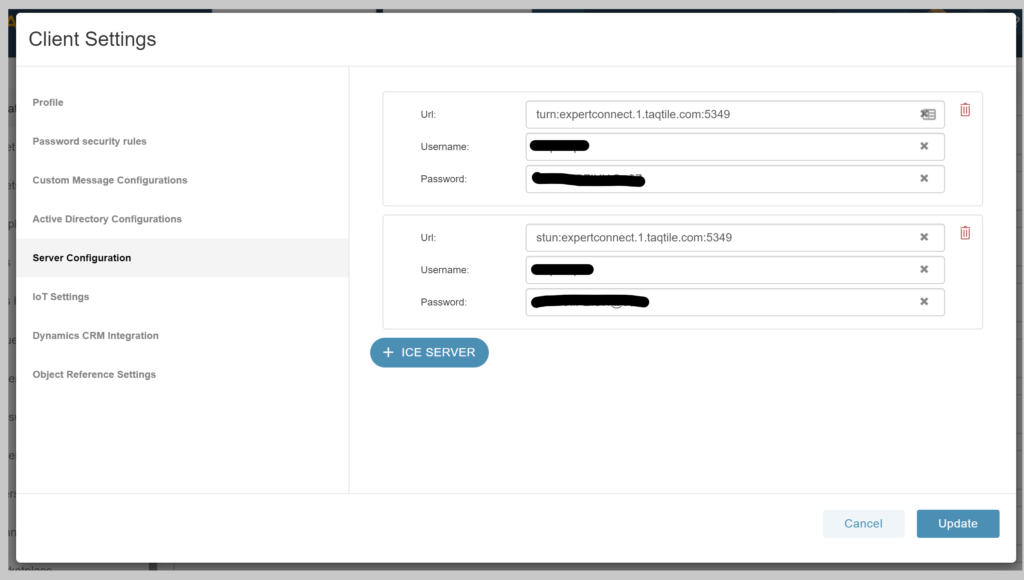
Check connectivity to Taqtile Connect services
You can check connectivity to Taqtile Connect services by using telnet. To perform this test, using either Unix or Windows Powershell: open your command line and enter ‘telnet expertconnect.1.taqtile.com 443’. You should see a message like this:

Additional steps to troubleshoot or report your issue
- If you are in a Manifest session on your 3D headset, sending a bug report will capture your logs for Taqtile engineers to further diagnose. Open the Manifest Settings option -> Select Bug Report tab -> Fill in the requested details and submit. You can follow-up with an email to Manifest Support.
- Completely shut down your device(s) and restart.
- Information on your firewall environment if applicable.
- Information on your proxy server if applicable.
- Information on your network, including if it is a corporate network (as corporate IT policies may be blocking connections).
- Any other pertinent information around the issue you are currently experiencing.